
Stop Reading Every Vendor Questionnaire by Hand
Questionnaires, SOC 2 reports and security ratings pile up faster than analysts can read them, and duplicate vendor profiles muddy the picture. TPRM agents do the reading, rate residual risk and draft findings for your analysts to approve.
48
Generally Available
8
GRC Domains
-
26
In Build Now
-
151+
On the Roadmap
TPRM
Vendors from intake to findings
-
Vendor Profile De-Duplication
Catches a duplicate vendor before it exists. Every new submission is scored against the registry on name, parent entity and domain, and anything above your confidence threshold is held for an analyst instead of quietly becoming a second record.
View agent : Vendor Profile De-Duplication -
Vendor Risk Analyzer
Analyses a vendor's residual risk profile across every enabled risk domain and returns a decision-support package: the key risk drivers, the overall posture, and the risk treatment actions required before you commit to the engagement.
View agent : Vendor Risk Analyzer -
Create Consolidated Finding List for High-Risk TPRM Engagements
Detects when a vendor engagement crosses the residual risk threshold and drafts the finding and remediation plan for it, grounded in how comparable findings were handled before. Every draft waits on a human reviewer before it becomes active.
View agent : Create Consolidated Finding List for High-Risk TPRM Engagements -
Enhancements to Vendor Response Analysis & Finding Generator
Reads a completed vendor questionnaire, identifies the answers that are genuinely wrong rather than merely negative, and writes a small number of consolidated findings with recommendations the relationship owner can actually act on.
View agent : Enhancements to Vendor Response Analysis & Finding Generator -
Generate Finding from RiskRecon Data
Reads the security risk monitoring data RiskRecon holds against a third party, drills into the domain ratings that score poorly, and drafts a single finding summarising what was found for the analyst to approve.
View agent : Generate Finding from RiskRecon Data -
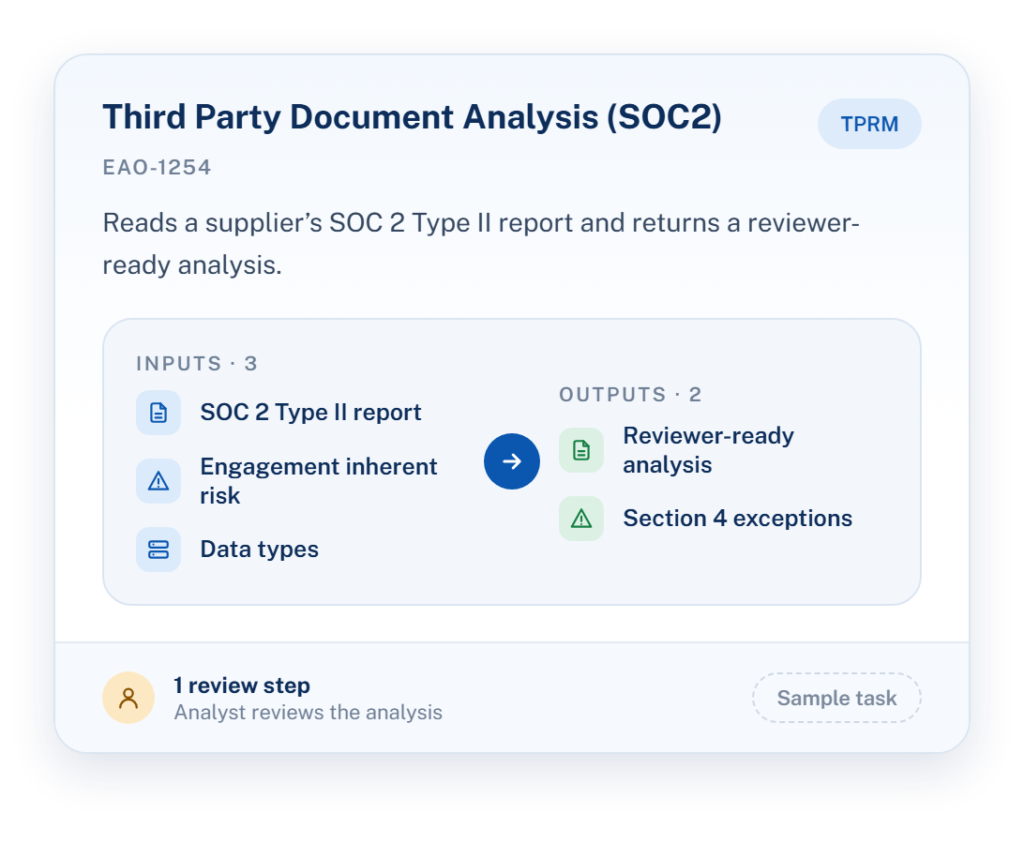
Third Party Document Analysis (SOC2)
Upload a supplier's SOC 2 Type II and get a reviewer-ready analysis: scope, trust services criteria covered, period end date, the opinion, and the exceptions in Section 4, read in the context of the engagement's own inherent risk and data types.
View agent : Third Party Document Analysis (SOC2) -
Vendor Risk Analyzer Enhancements
Makes the Vendor Risk Analyzer adapt to how each Archer instance is set up. Instead of relying on fixed field names, it works out which fields matter most, and three settings let you say which risk domains, which KPI application and which supporting data to use.
View agent : Vendor Risk Analyzer Enhancements -
Vendor Response Analysis & Finding Generator
Reads a questionnaire submitted by a vendor, checks whether it was completed properly, and drafts a consolidated set of findings with remediation plans for the analyst to review. Nothing reaches Archer until the analyst approves it in Evolv Chat.
View agent : Vendor Response Analysis & Finding Generator
TPRM
8Vendors from intake to findings
Vendors from intake to findings
-
Vendor Profile De-Duplication
Catches a duplicate vendor before it exists. Every new submission is scored against the registry on name, parent entity and domain, and anything above your confidence threshold is held for an analyst instead of quietly becoming a second record.
View agent : Vendor Profile De-Duplication -
Vendor Risk Analyzer
Analyses a vendor's residual risk profile across every enabled risk domain and returns a decision-support package: the key risk drivers, the overall posture, and the risk treatment actions required before you commit to the engagement.
View agent : Vendor Risk Analyzer -
Create Consolidated Finding List for High-Risk TPRM Engagements
Detects when a vendor engagement crosses the residual risk threshold and drafts the finding and remediation plan for it, grounded in how comparable findings were handled before. Every draft waits on a human reviewer before it becomes active.
View agent : Create Consolidated Finding List for High-Risk TPRM Engagements -
Enhancements to Vendor Response Analysis & Finding Generator
Reads a completed vendor questionnaire, identifies the answers that are genuinely wrong rather than merely negative, and writes a small number of consolidated findings with recommendations the relationship owner can actually act on.
View agent : Enhancements to Vendor Response Analysis & Finding Generator -
Generate Finding from RiskRecon Data
Reads the security risk monitoring data RiskRecon holds against a third party, drills into the domain ratings that score poorly, and drafts a single finding summarising what was found for the analyst to approve.
View agent : Generate Finding from RiskRecon Data -
Third Party Document Analysis (SOC2)
Upload a supplier's SOC 2 Type II and get a reviewer-ready analysis: scope, trust services criteria covered, period end date, the opinion, and the exceptions in Section 4, read in the context of the engagement's own inherent risk and data types.
View agent : Third Party Document Analysis (SOC2) -
Vendor Risk Analyzer Enhancements
Makes the Vendor Risk Analyzer adapt to how each Archer instance is set up. Instead of relying on fixed field names, it works out which fields matter most, and three settings let you say which risk domains, which KPI application and which supporting data to use.
View agent : Vendor Risk Analyzer Enhancements -
Vendor Response Analysis & Finding Generator
Reads a questionnaire submitted by a vendor, checks whether it was completed properly, and drafts a consolidated set of findings with remediation plans for the analyst to review. Nothing reaches Archer until the analyst approves it in Evolv Chat.
View agent : Vendor Response Analysis & Finding Generator
Assess Third Parties With Less Manual Review
Vendor due diligence means reading questionnaires, reports and ratings one vendor at a time. Archer Evolv TPRM agents take on the reading: they keep the registry clean, analyze responses and documents, assess residual risk and draft findings for analysts to approve.
Onboard
Agents score each new vendor submission against the registry and route likely duplicates to an analyst before they enter Archer.
Handled by
Vendor Profile De-Duplication
分析する
Agents read questionnaire responses and supplier documents for completeness and intent, and pull out the exceptions that matter.
Handled by
Vendor Response Analysis & Finding Generator · Enhancements to Vendor Response Analysis & Finding Generator · Third Party Document Analysis (SOC2)
Assess
Agents read residual risk across every enabled domain and return the key risk drivers, overall posture and required treatment actions.
Handled by
Vendor Risk Analyzer · Vendor Risk Analyzer Enhancements
法
Agents draft findings and remediation plans, including from security ratings and for Tier 1 vendors, and hold them for analyst approval.
Handled by
Generate Finding from RiskRecon Data · Create Consolidated Finding List for High-Risk TPRM Engagements
Before and after
Third-party risk teams are buried in questionnaires, documents and duplicate vendor records.
Questionnaires and spreadsheets
Today, assessing a vendor means reading every response by hand and rebuilding the picture in a spreadsheet.
What it takes today
-
Duplicate vendor profiles creep into the registry
-
Analysts read long questionnaires and SOC 2 reports line by line
-
Risk is pieced together from separate domains and tools
-
Findings and remediation plans are drafted from scratch
Analyze, assess, draft, approve
Agents read the evidence, rate the risk and draft findings, and analysts approve everything before it is recorded.
What changes
-
Duplicate vendors caught before they enter Archer
-
Questionnaire responses and SOC 2 reports analyzed for the analyst
-
Residual risk read across every enabled domain
-
Findings and remediation plans drafted for human approval
See TPRM Agents in Action
Watch Third Party Document Analysis turn a supplier’s SOC 2 Type II report into a reviewer-ready analysis.
-
1
Upload the report
Add the supplier’s SOC 2 Type II report for the engagement.
-
2
Review the analysis
AI summarizes the scope, criteria covered, period end date, opinion and exceptions, read against the engagement’s inherent risk and data types.
-
3
Decide on follow-up
The analyst reviews the analysis and decides which exceptions need follow-up with the supplier.